Explain the error first
Here is an error from my app: [paste error]. Steps to reproduce: [steps].
Before changing any code, explain what is causing this and which files are involved.
🛟 When something breaks
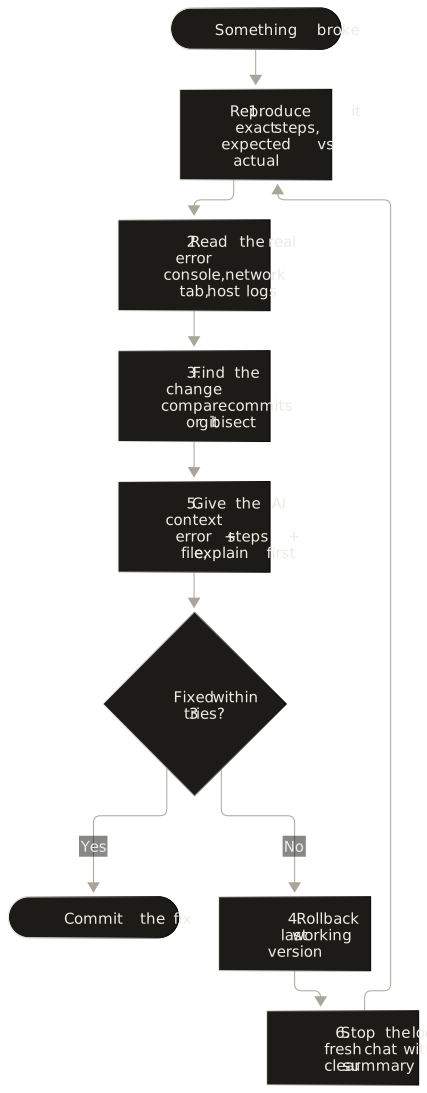
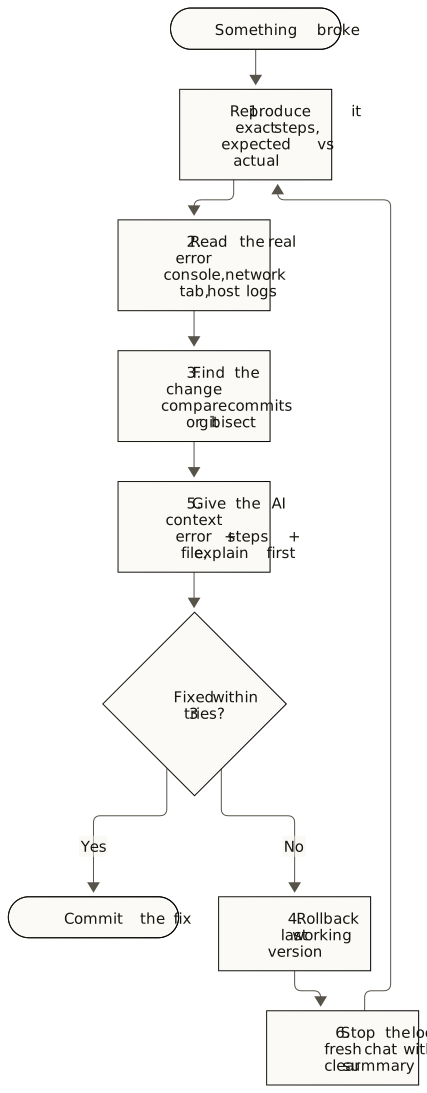
Use the same calm method every time, whatever tool you use: six steps, three prompts, and the point where you should stop prompting.
Write down the exact steps, what you expected and what happened. If you cannot make it happen again, you cannot confirm a fix.
Open your browser's developer console and network tab, and check your host's logs. The error message is usually more useful than the symptom.
Ask "what changed since it last worked?" Compare commits, or use git bisect to find the exact commit.
Restoring the last working version is a valid fix while you investigate. Use your host's rollback (for example Vercel instant rollback) or git revert.
Paste the exact error, the steps to reproduce and the relevant file. Ask it to explain the cause before it changes anything.
If three attempts have not fixed it, stop prompting. Each new attempt can add more changes on top of the problem. Roll back, then try a fresh conversation with a clear summary.
Copy-paste prompts
Here is an error from my app: [paste error]. Steps to reproduce: [steps]. Before changing any code, explain what is causing this and which files are involved.
This worked at commit [hash or description] and broke after [change].
Compare the two and tell me which change caused the problem. Do not edit anything yet.
Fix only this issue. Do not change unrelated files, rename things or add new packages.
After the fix, list every file you changed and why.
Watch out
Missing access rules are the most common serious problem in AI-built apps. In 2025, researchers found 170 apps built with one popular builder that exposed user data this way (CVE-2025-48757). Turning on Row Level Security without writing policies blocks everything, so test with two real accounts.
Watch out
Login that works in preview but loops or fails on your real domain usually means the domain is missing from your auth provider's allowed redirect URLs. See Supabase redirect URLs.
Watch out
If payments succeed in Stripe but your app never updates, the webhook is usually pointing at the wrong URL, using a test-mode secret in live mode, or failing signature checks. Test locally with the Stripe CLI.